Plotbee Video Demo
This is to show the capabilities of plotbee. The objective of this notebook is to show: * Loading Detections and Video
Load Dependecies
[1]:
%load_ext autoreload
%autoreload 2
[2]:
import os
from plotbee.body import Body
from plotbee.frame import Frame
from plotbee.video import Video
from plotbee.track import Track
from plotbee.utils import read_json
import plotbee.videoplotter as vplt
from collections import defaultdict
import cv2

import matplotlib.pyplot as plt
plt.rcParams['figure.figsize'] = [20, 20]
Loading Detections
[3]:
video = Video.load("../data/C02_170622120000_skeleton.json")
100%|██████████| 6000/6000 [00:01<00:00, 5470.77it/s]
print(video) shows the video name, detection file and lenght of the video in frames.
[4]:
print(video)
Video(name=C02_170622120000.mp4, detections=merged_C02_170622120000_detections.json, len=6000)
[5]:
len(video) # amount of frames
[5]:
6000
The video object is an iterable, that returns frames.
[6]:
type(video), type(video[0])
[6]:
(plotbee.video.Video, plotbee.frame.Frame)
Each frame has a list of detections (Body).
[7]:
video[0]
[7]:
Frame: 0
Body(id=-1, parts={1: [(992, 1124)], 2: [(1000, 884)], 3: [(996, 944)], 4: [(1052, 816)], 5: [(960, 836)])
Body(id=-1, parts={1: [(1744, 1056)], 2: [(1856, 1276)], 3: [(1816, 1216)], 4: [(1948, 1272)], 5: [(1948, 1252)])
Body(id=-1, parts={1: [(736, 540)], 2: [(644, 784)], 3: [(668, 728)], 4: [(584, 780)], 5: [(672, 828)])
Body(id=-1, parts={1: [(404, 280)], 2: [(644, 376)], 3: [(576, 336)], 4: [(664, 452)], 5: [(728, 364)])
Body(id=-1, parts={1: [(592, 992)], 2: [(516, 756)], 3: [(532, 816)], 4: [(568, 708)], 5: [(480, 700)])
Body(id=-1, parts={1: [(884, 732)], 2: [(724, 920)], 3: [(768, 868)], 4: [(644, 892)], 5: [(728, 944)])
Body(id=-1, parts={1: [(1884, 612)], 2: [(1720, 780)], 3: [(1768, 764)], 4: [(1652, 732)], 5: [(1684, 828)])
Body(id=-1, parts={1: [(880, 460)], 2: [(916, 696)], 3: [(916, 644)], 4: [(880, 724)], 5: [(932, 716)])
Body(id=-1, parts={1: [(2108, 1212)], 2: [(2144, 1020)], 3: [(2084, 1032)], 4: [(2192, 1100)], 5: [(2196, 1056)])
Body(id=-1, parts={1: [(2132, 316)], 2: [(1976, 116)], 3: [(2024, 164)], 4: [(1980, 60)], 5: [(1892, 124)])
[8]:
frame0 = video[0]
body = frame0[0]

type(frame0), type(body)
[8]:
(plotbee.frame.Frame, plotbee.body.Body)
video slicing
You can slice videos as list
[9]:
short_video = video[:10]
double_speed_video = video[::2]

len(short_video), len(double_speed_video)
[9]:
(10, 3000)
Plotting Video
The Video object hold the detection data, to plot images we need to specify the video location.
[10]:
video.load_video("../data/C02_170622120000.mp4")
Plot a Frame
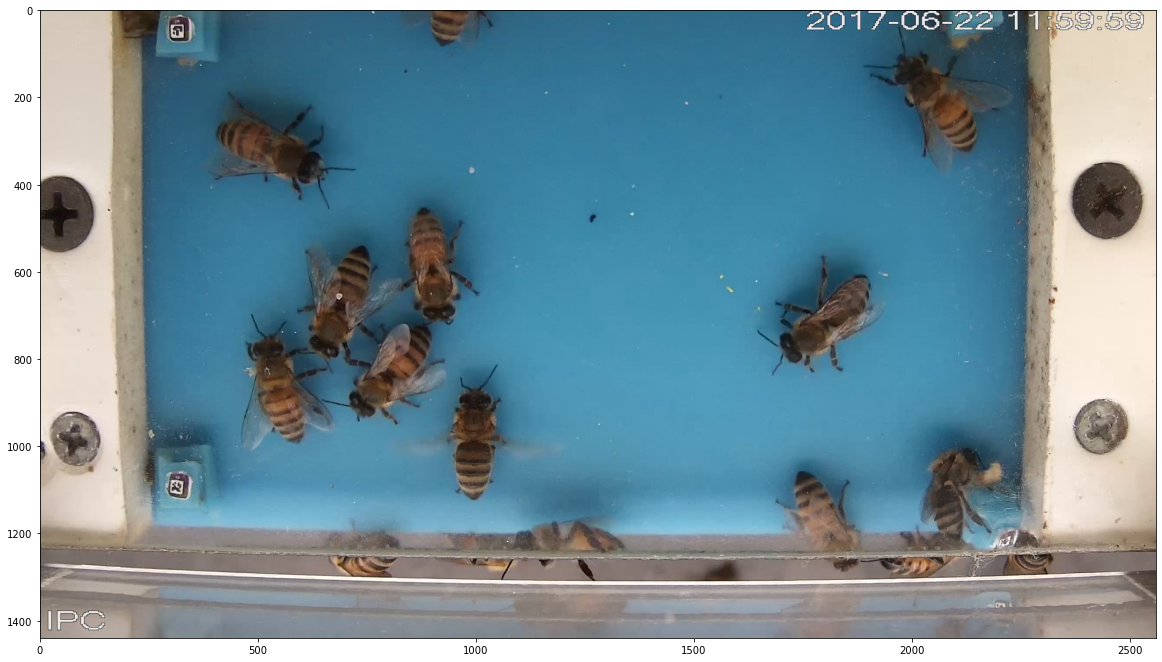
[11]:
vplt.imshow(video[0])
Plot a body
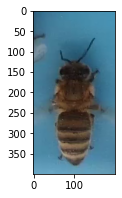
[12]:
plt.figure(figsize=(4, 3))
vplt.imshow(video[0][0]);
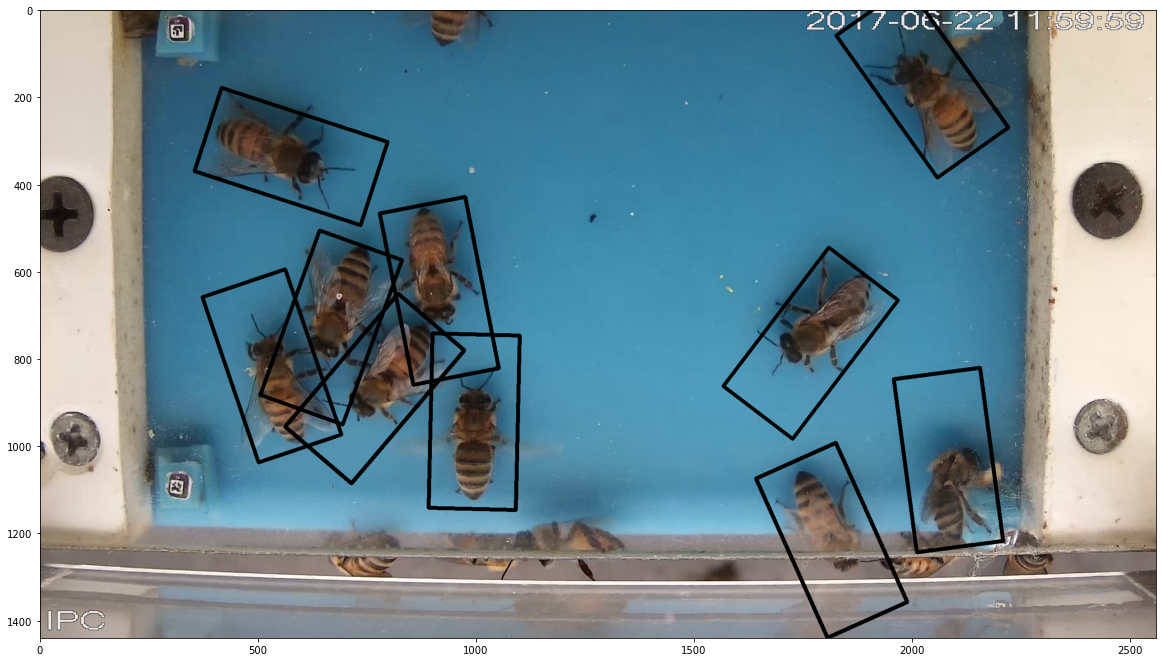
Plot Detections
[13]:
vplt.bbox(video[0]);
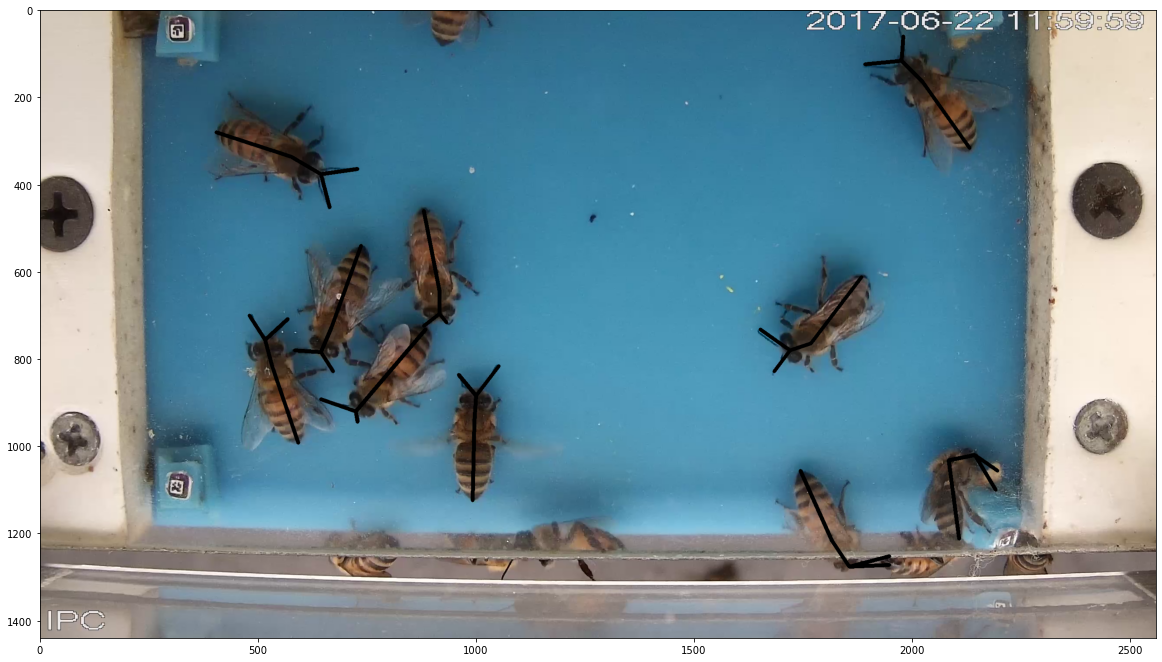
Plot skeleton
[14]:
vplt.skeleton(video[0]);
Tracking
Perform hugarian tracking.
[15]:
video.hungarian_tracking()
100%|██████████| 6000/6000 [00:00<00:00, 127705.11it/s]
  4%|▍         | 226/6000 [00:00<00:02, 2252.55it/s]
Tracking...
100%|██████████| 6000/6000 [00:03<00:00, 1666.13it/s]
Convert to Track format
Note that the bodies has id now.
[16]:
video[0]
[16]:
Frame: 0
Body(id=0, parts={1: [(992, 1124)], 2: [(1000, 884)], 3: [(996, 944)], 4: [(1052, 816)], 5: [(960, 836)])
Body(id=1, parts={1: [(1744, 1056)], 2: [(1856, 1276)], 3: [(1816, 1216)], 4: [(1948, 1272)], 5: [(1948, 1252)])
Body(id=2, parts={1: [(736, 540)], 2: [(644, 784)], 3: [(668, 728)], 4: [(584, 780)], 5: [(672, 828)])
Body(id=3, parts={1: [(404, 280)], 2: [(644, 376)], 3: [(576, 336)], 4: [(664, 452)], 5: [(728, 364)])
Body(id=4, parts={1: [(592, 992)], 2: [(516, 756)], 3: [(532, 816)], 4: [(568, 708)], 5: [(480, 700)])
Body(id=5, parts={1: [(884, 732)], 2: [(724, 920)], 3: [(768, 868)], 4: [(644, 892)], 5: [(728, 944)])
Body(id=6, parts={1: [(1884, 612)], 2: [(1720, 780)], 3: [(1768, 764)], 4: [(1652, 732)], 5: [(1684, 828)])
Body(id=7, parts={1: [(880, 460)], 2: [(916, 696)], 3: [(916, 644)], 4: [(880, 724)], 5: [(932, 716)])
Body(id=8, parts={1: [(2108, 1212)], 2: [(2144, 1020)], 3: [(2084, 1032)], 4: [(2192, 1100)], 5: [(2196, 1056)])
Body(id=9, parts={1: [(2132, 316)], 2: [(1976, 116)], 3: [(2024, 164)], 4: [(1980, 60)], 5: [(1892, 124)])
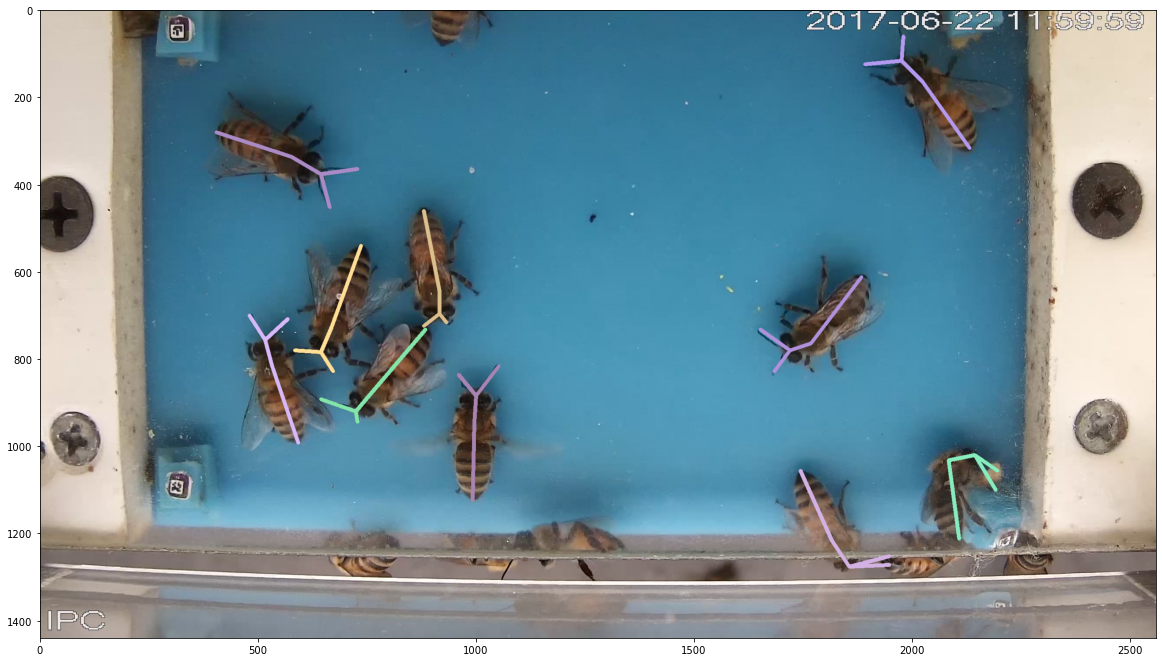
Now the skletons has color by id.
[17]:
vplt.skeleton(video[0]);
Plotting Tracks
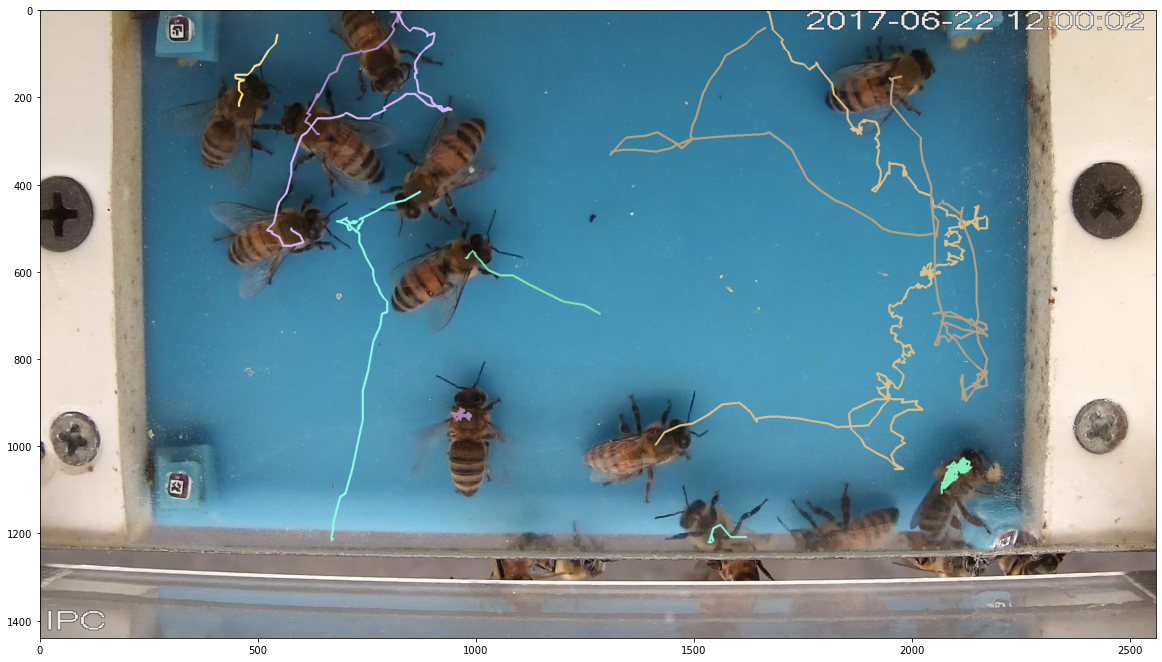
[18]:
vplt.tracks(video[50]); #default direction=Forward
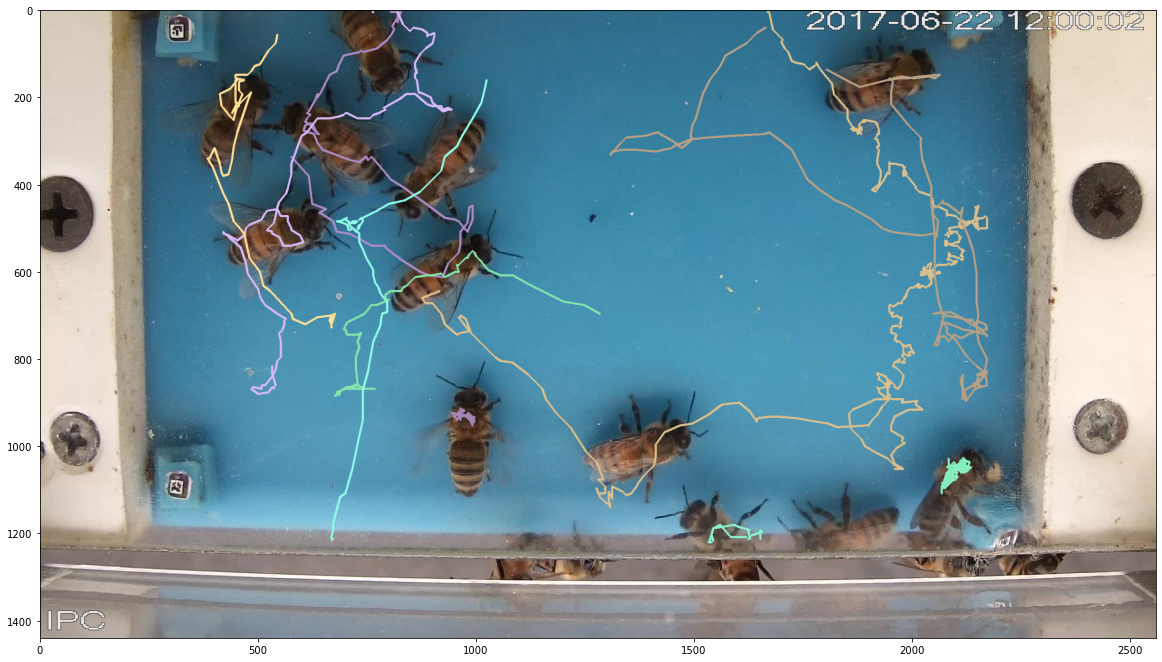
[19]:
vplt.tracks(video[50], direction="FULL");
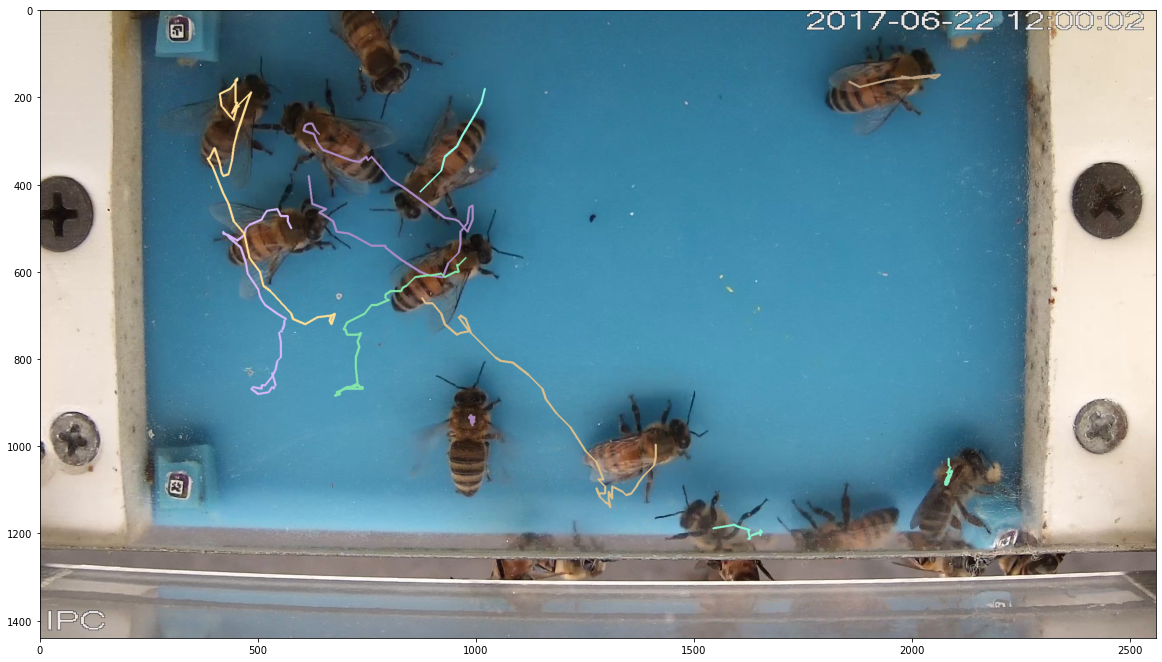
[20]:
vplt.tracks(video[50], direction="BACKWARD");
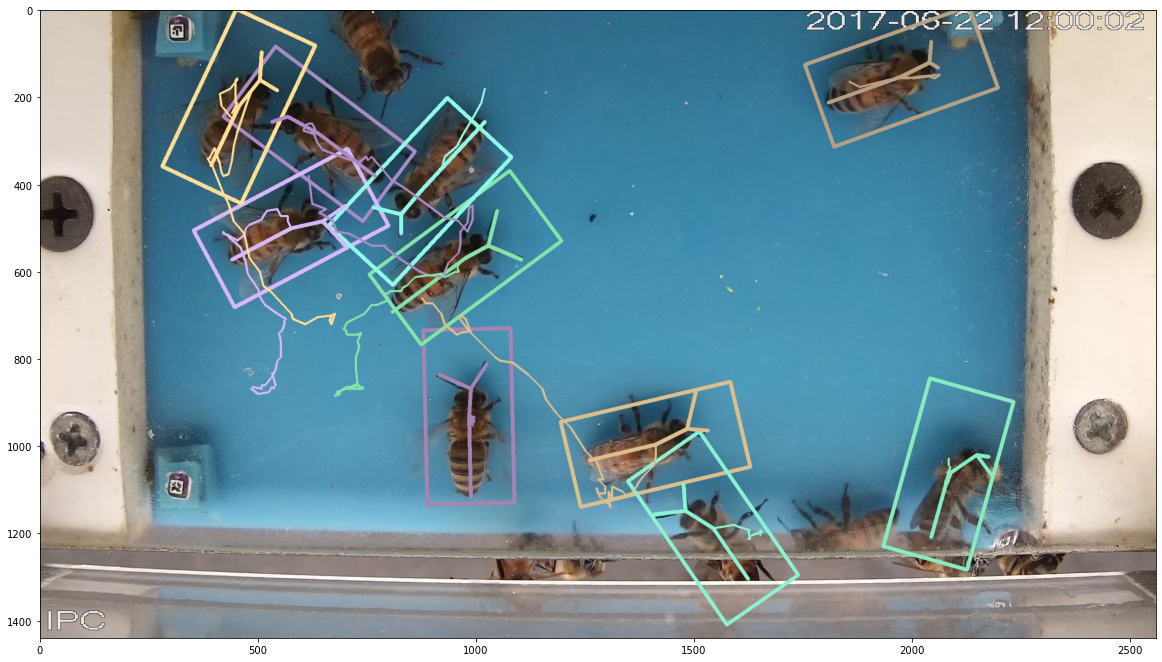
Plot Everything with vplt.imshow
min_parts only plot detections with at least min_parts parts detected.
[21]:
vplt.imshow(video[50], bbox=True, skeleton=True, tracks=True, track_direction="BACKWARD", min_parts=1);
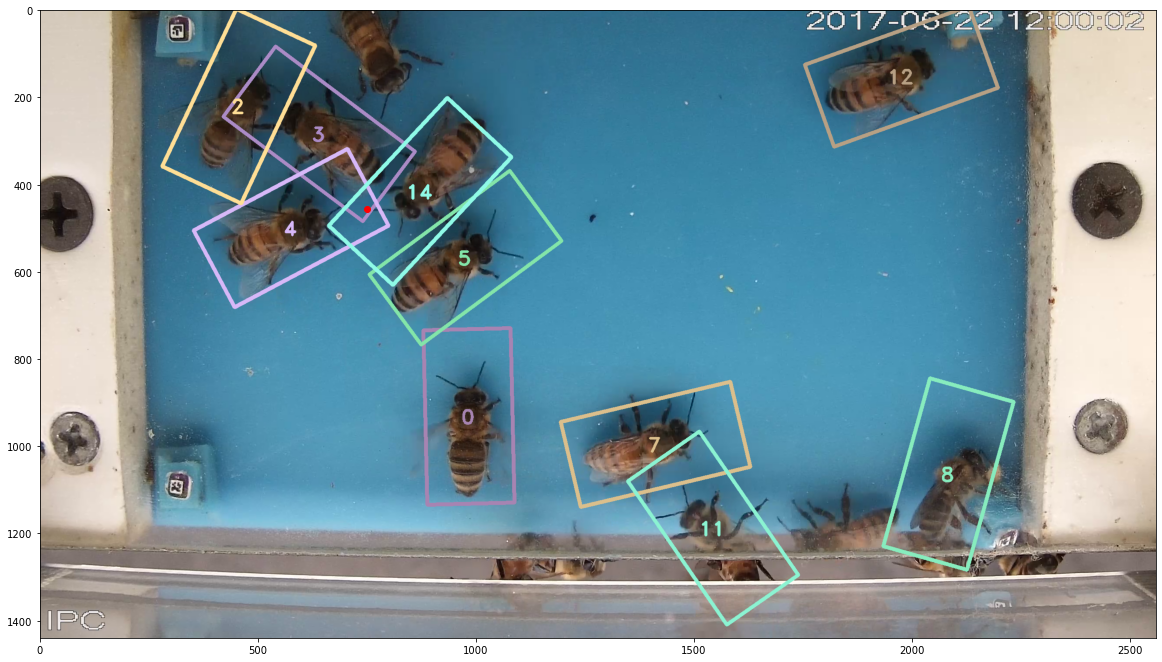
Get bodies overlapping at poitnt
[22]:
vplt.bbox(video[50], idtext=True)
plt.scatter(750, 455, color="r"); # An overlapping point
[23]:
point = (750, 455)
video[50].bodies_at_point(point)
/home/jchan/beepose/plotbee/plotbee/frame.py:247: UserWarning: More than one body in (750, 455) point.
  warnings.warn("More than one body in {} point.".format(p))
[23]:
[Body(id=3, parts={1: [(768, 380)], 2: [(568, 244)], 3: [(640, 284)], 5: [(532, 256)]),
 Body(id=4, parts={1: [(440, 572)], 2: [(648, 484)], 3: [(576, 500)], 4: [(700, 540)], 5: [(700, 448)]),
 Body(id=14, parts={1: [(1020, 256)], 2: [(828, 468)], 3: [(872, 416)], 4: [(764, 452)], 5: [(828, 512)])]
Common Functions
[24]:
print(video)
Video(name=C02_170622120000.mp4, detections=merged_C02_170622120000_detections.json, len=6000)
[25]:
len(video) # return the amount of frames
[25]:
6000
Access to tracks:
[26]:
tracks = video.tracks
# tracks #uncomment this
Access to frames:
[27]:
frames = video.frames
[28]:
for frame in video:
    pass # iterate throught frames
[29]:
n = 10
nth_frame = video[n]
print(nth_frame)
Frame: 10
Body(id=0, parts={1: [(996, 1124)], 2: [(992, 880)], 3: [(996, 940)], 4: [(1044, 804)], 5: [(936, 848)])
Body(id=5, parts={1: [(896, 856)], 2: [(664, 864)], 3: [(740, 868)], 4: [(660, 820)], 5: [(652, 892)])
Body(id=1, parts={1: [(1860, 1084)], 2: [(1724, 1280)], 3: [(1776, 1220)])
Body(id=2, parts={1: [(692, 680)], 2: [(472, 608)], 3: [(528, 644)], 4: [(476, 536)], 5: [(440, 632)])
Body(id=3, parts={1: [(608, 424)], 2: [(824, 576)], 3: [(760, 540)], 4: [(832, 612)], 5: [(892, 564)])
Body(id=4, parts={1: [(492, 1028)], 2: [(544, 800)], 3: [(508, 868)], 4: [(600, 804)], 5: [(544, 764)])
Body(id=8, parts={1: [(2052, 1204)], 2: [(2152, 1012)], 3: [(2084, 1060)], 4: [(2196, 1060)], 5: [(2180, 1020)])
Body(id=6, parts={1: [(1516, 928)], 2: [(1344, 1148)], 3: [(1392, 1104)], 4: [(1260, 1148)], 5: [(1340, 1204)])
Body(id=7, parts={1: [(836, 616)], 2: [(1028, 724)], 3: [(964, 704)], 5: [(1100, 684)])
Slicing Video
[30]:
short_video = video[:10]
double_speed_video = video[::2]

len(short_video), len(double_speed_video)
[30]:
(10, 3000)
Frame API
[31]:
frame = video[2] # 0 - (len(video) - 1)
type(frame)
[31]:
plotbee.frame.Frame
The frame object contains body objects
[32]:
len(frame) # return the amount of body detected in this frame
[32]:
10
[33]:
print(frame)
Frame: 2
Body(id=0, parts={1: [(996, 1124)], 2: [(1004, 876)], 3: [(992, 944)], 4: [(1072, 836)], 5: [(984, 844)])
Body(id=2, parts={1: [(680, 528)], 2: [(688, 760)], 3: [(676, 696)], 4: [(660, 788)], 5: [(708, 792)])
Body(id=1, parts={1: [(1764, 1044)], 2: [(1824, 1280)], 3: [(1804, 1216)], 4: [(1924, 1276)], 5: [(1944, 1248)])
Body(id=5, parts={1: [(876, 784)], 2: [(656, 880)], 3: [(712, 864)], 4: [(608, 860)], 5: [(632, 920)])
Body(id=9, parts={1: [(2040, 216)], 2: [(1816, 104)], 3: [(1876, 140)], 4: [(1800, 44)], 5: [(1732, 104)])
Body(id=6, parts={1: [(1836, 668)], 2: [(1620, 760)], 3: [(1684, 752)], 4: [(1540, 732)], 5: [(1580, 844)])
Body(id=3, parts={1: [(512, 296)], 2: [(664, 508)], 3: [(624, 444)], 4: [(648, 544)], 5: [(700, 528)])
Body(id=4, parts={1: [(572, 1012)], 2: [(528, 784)], 3: [(540, 860)], 4: [(560, 728)], 5: [(504, 780)])
Body(id=8, parts={1: [(2096, 1212)], 2: [(2152, 1012)], 3: [(2084, 1044)], 4: [(2196, 1076)], 5: [(2180, 1024)])
Body(id=7, parts={1: [(884, 484)], 2: [(892, 732)], 3: [(884, 672)], 4: [(860, 756)], 5: [(944, 740)])
[34]:
body = frame[0] # Accesing to the body
[35]:
for body in frame:
    print(body.info())
{'id': 0, 'frame': 2, 'angle': 1.273030020056711, 'x': 992, 'y': 944, 'parts_num': 5}
{'id': 2, 'frame': 2, 'angle': 178.6360724683971, 'x': 676, 'y': 696, 'parts_num': 5}
{'id': 1, 'frame': 2, 'angle': 193.09189306434686, 'x': 1804, 'y': 1216, 'parts_num': 5}
{'id': 5, 'frame': 2, 'angle': 116.00334584451144, 'x': 712, 'y': 864, 'parts_num': 5}
{'id': 9, 'frame': 2, 'angle': 65.13630342824813, 'x': 1876, 'y': 140, 'parts_num': 5}
{'id': 6, 'frame': 2, 'angle': 118.92642583525362, 'x': 1684, 'y': 752, 'parts_num': 5}
{'id': 3, 'frame': 2, 'angle': 217.1168606832703, 'x': 624, 'y': 444, 'parts_num': 5}
{'id': 4, 'frame': 2, 'angle': 11.888658039627975, 'x': 540, 'y': 860, 'parts_num': 5}
{'id': 8, 'frame': 2, 'angle': 4.085616779974877, 'x': 2084, 'y': 1044, 'parts_num': 5}
{'id': 7, 'frame': 2, 'angle': 180.0, 'x': 884, 'y': 672, 'parts_num': 5}
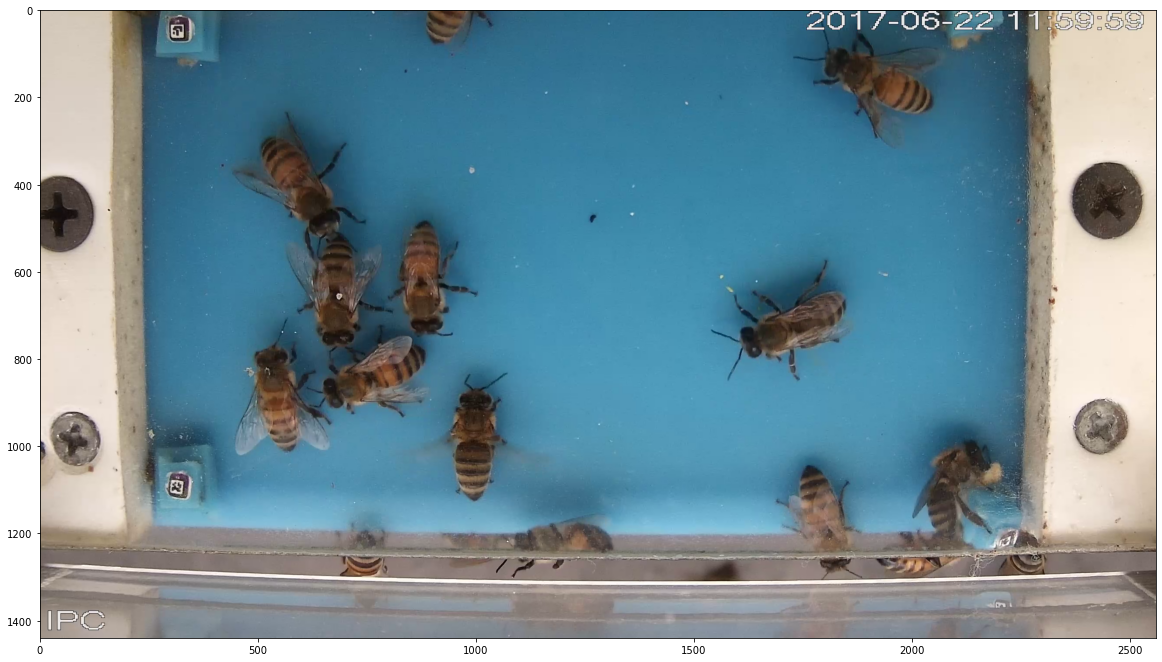
Get the image
[36]:
plt.imshow(frame.image); # .image method
Save the frame
[37]:
# .save(folder, args) has the same args as .plot() and .image() plus the path to save.
# frame.save('frames/', args) # uncomment this to save the frame
frame.save('frames/', skeleton=True, bbox=True, min_parts=5, tracks=True)
Body API
[38]:
body = frame[0]
type(body)
[38]:
plotbee.body.Body
[39]:
print(body)
Body(id=0, parts={1: [(996, 1124)], 2: [(1004, 876)], 3: [(992, 944)], 4: [(1072, 836)], 5: [(984, 844)])
[40]:
len(body) # return amount of detected parts of the body
[40]:
5
[41]:
print("Body id: {}, Frame id: {}".format(body.id, body.frameid))
Body id: 0, Frame id: 2
[42]:
body.angle, body.center
[42]:
(1.273030020056711, (992, 944))
[43]:
body.info()
[43]:
{'id': 0,
 'frame': 2,
 'angle': 1.273030020056711,
 'x': 992,
 'y': 944,
 'parts_num': 5}
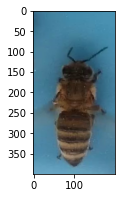
[44]:
plt.figure(figsize=(4, 3))
vplt.imshow(body)
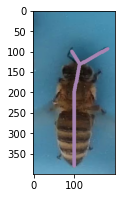
[45]:
plt.figure(figsize=(4, 3))
vplt.skeleton(body)
Annotate Body
[46]:
body.annotations
[46]:
{}
[47]:
body.annotate("pollen", False)
[48]:
body.annotations
[48]:
{'pollen': False}
Video Animation
Video animations show a video using FuncAnimations. Usually, short videos around ~200 frames takes one minute to process.
[48]:
short_video = video[::20]
anim = vplt.VideoAnimation(short_video)
anim.show()
[49]:
anim.save("video.mp4")
100%|██████████| 300/300 [01:55<00:00, 2.95it/s]
Exporting
[50]:
# this will call .save() to all the frame in the video.
OUTPUT_PATH = ""
video.export(os.path.join(OUTPUT_PATH, "video_images/"), skeleton=True, bbox=False, tracks=False, min_parts=5, max_workers=40)
To convert the folder to video used the follwing comand:
ffmpeg -r 60 -f image2 -s 1920x1080 -i video_images/%09d.jpg -vcodec libx264 -crf 25 -pix_fmt yuv420p video.mp4
[51]:
# this will call .save() to all the bodies in all frames in the video.
# plus save a dataset.csv which is .info() + path to the image for all the bodies.
video.export_bodies(os.path.join(OUTPUT_PATH, "extract_bodies_with_json2/"), max_workers=20)
[52]:
video.save("save.json") # this will save the skeleton.json